Additional sensors
Contents
- MA10100
- MA10101
- MA10200
- MA10230
- MA10300
- MA10320 - pro series
- MA10350
- MA10650 - pro series
- MA10660
- MA10800
- MA10850
- WL2000
- Other sensors
<<<
back to the help
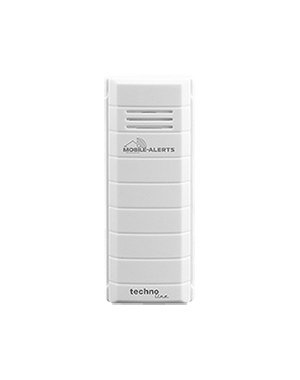
MA10100
Temperature sensor
Master ID02
Usage
Sensor for monitoring of indoor or outdoor temperatures. The sensor must be mounted protected from direct sun and rain.
Specifications
Batteries:
2 x micro (LR03, AAA) alkaline
Battery life:
approx. 2 years
Measuring range:
– 29.9°C to + 59.9°C
Accuracy:
+/- 1°C
Measurement intervals:
7 minutes
Transmission range:
100m (open area)
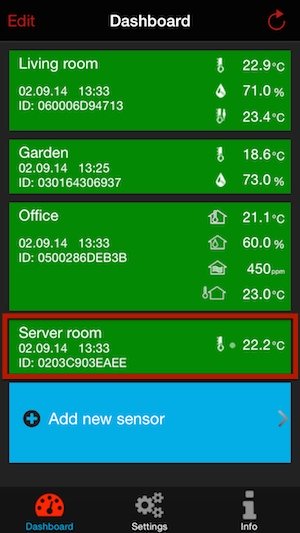
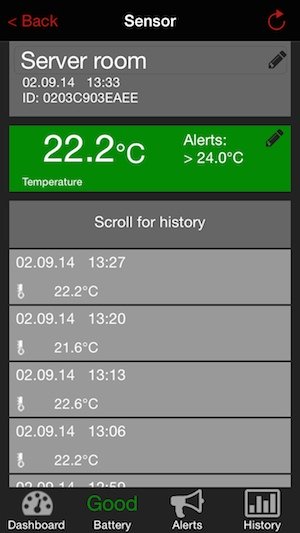
Representation in the app
<<<
back to the sensor overview
<<<
back to the help
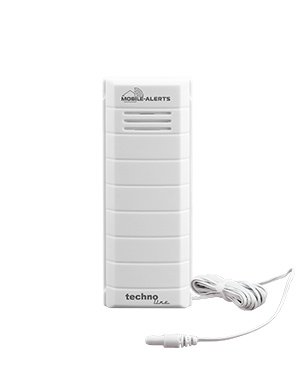
MA10101
Temperature sensor with additional temperature cable sensor
Master ID02
Usage
Sensor
for monitoring of indoor or outdoor temperatures and non corrosive
liquids. The sensor must be mounted protected from direct sun and rain.
Specifications
Batteries:
2 x micro (LR03, AAA) alkaline
Battery life:
approx. 2 years
Measuring range:
– 29.9°C to + 59.9°C
Accuracy:
+/- 1°C
Measurement intervals:
7 minutes
Transmission range:
100m (open area)
Cable length:
1m
Representation in the app
<<<
back to the sensor overview
<<<
back to the help
MA10200
Temperature and hygrometer sensor
Master ID03
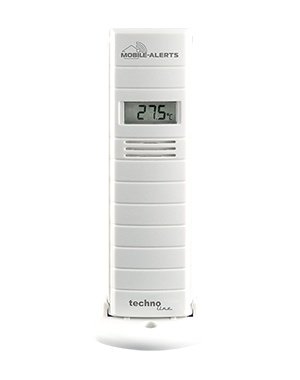
Usage
Sensor
for monitoring of indoor or outdoor temperatures and humidity. The
sensor must be mounted protected from direct sun and rain.
Specifications
Batteries:
2 x mignon (LR06, AA) alkaline
Battery life:
approx. 2 years
Measuring range temperature:
– 39.9°C to + 59.9°C
Accuracy temperature:
+/- 1°C
Measuring range humidity:
20% to 99%
Accuracy range humidity:
+/- 4%
Measurement intervals:
7 minutes
Transmission range:
100m (open area)
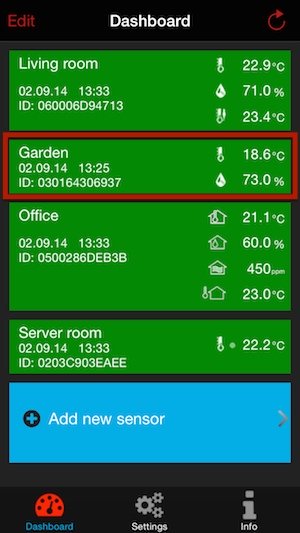
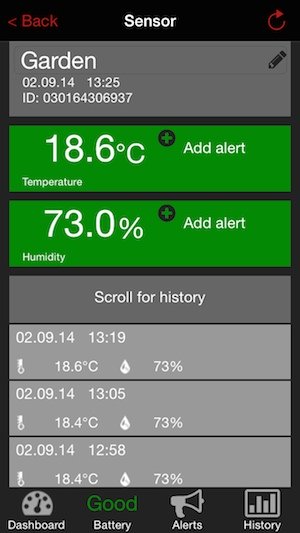
Representation in the app
<<<
back to the sensor overview
<<<
back to the help
MA10230
Indoor climate station
Master ID12

Usage
Station
for monitoring of indoor temperature and humidity. Pairable with one outdoor sensor (ID03) to give a ventilation recommendation. The
sensor must be mounted protected from direct sun and rain.
Specifications
Batteries:
2 x mignon (LR06, AA) alkaline
Battery life:
approx. 2 years
Measuring range temperature:
– 9.9°C to + 59.9°C
Accuracy temperature:
+/- 0.8°C°C
Measuring range humidity:
1% to 99%
Accuracy range humidity:
3%
Transmission frequency:
868 MH
Transmission range:
100m (open area)
Representation in the app
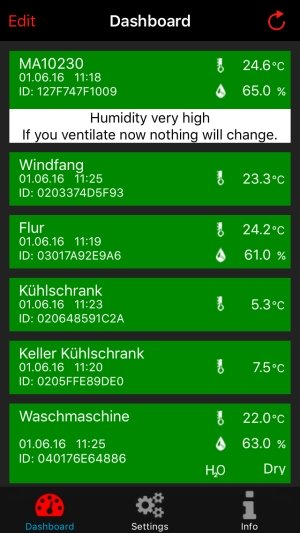
Below the display for measured temperature and humidity, there is an additional field about the current indoor humidity.
The following informations can be displayed:
- Humidity is very low below 34% rH
- Humidity is low 34% rH to 40% rH
- Optimal humidity 41% rH to 55% rH
- Humidity is high 56% rH to 64% rH
- Humidity is very high above 65% rH
If you pair the MA 10230 with an external sensor ID03, MA 10200, MA10250 in the app, you will get a ventilation recommendation. The ventilation recommendation assumes that the room is ventilated for 10 minutes with the windows wide open and the paired outdoor sensor is mounted in location protected of direct sun and rain.Please refer to the instructions for placement in the respective operating instructions.
If you ventilate now nothing will change!
This is displayed when the humidity calculation gives a +/- 4% different value of the current value.
If you ventilate now it will be more dry!
This is displayed when the humidity after ventilating decreases by at least 5%.
If you ventilate now it will be more wet!
This is displayed when the humidity after ventilating increases by at least 5%.
Tap the MA 10230 to enter sensor menu.
Sensor Menu
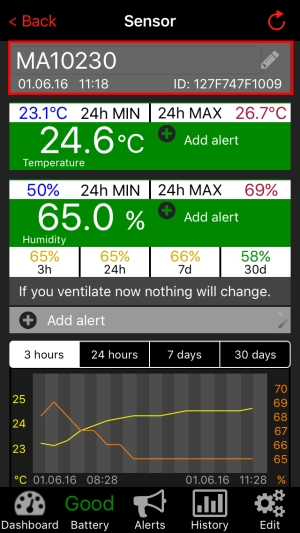
Tap on the first line to the left of the pencil icon to set a name for the sensor.
Below you can see the time of the last transmitted values and the ID of the sensor.
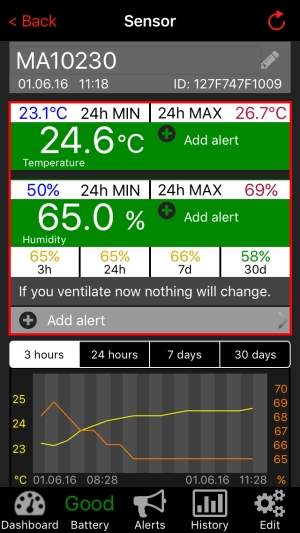
Above the current temperature and humidity a MIN and MAX value of the last 24 hours is displayed. The 24 average is calculated automatically and can not be reset by the user. Tap to the right of the current measured value to open the alarm setting. (Explaining the adjustment, see Alert settings)
Further below there are current humidity averages for 4 different time periods, 3 hours (3h), 24 hours (24 hours), 7 days (7d) and 30 days (30d). The figures are displayed up to 55% in green, to 64% in yellow and from 65% in red.
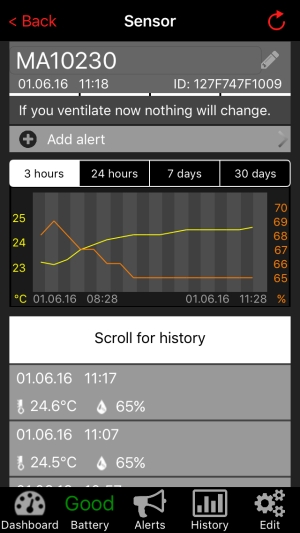
With Add alert, you can set alarms for average humidity of certain periods. (Explanation of the average setting alarm values for indoor humidity see below)
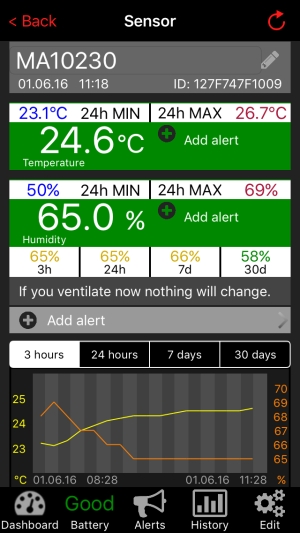
In the graph you can display values for different periods of time, tap to select a period.
Below the graph is the history of the last 50 readings. There are no averages in the history displayed.
Information about battery status, see here
Under Alerts you can find the past alerts.
Information about History display, see here.
Under Edit you can have use a sensor ID03, e.g. MA10200, to set it as an external sensor for determining the ventilation recommendation. Tap the field ID :, to select a sensor from your sensor overview.
Menu "Add Alert" for average humidity
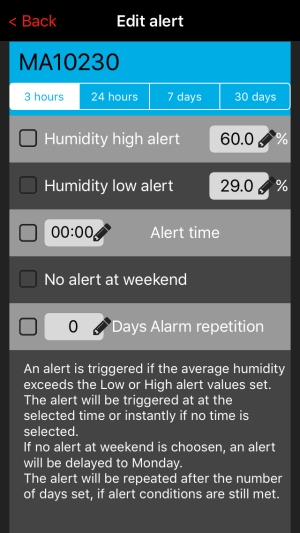
Here alarms for indoor humidity averages for periods of 3 hours, 24 hours, 7 days and 30 days can be set. Tap a period, to set or edit an alarm. Below you can set an alert for high/low average values you want to be alerted. Set a time you want to be alerted. An alert is triggered if the average value is above or below the alert value at the set time. The alert will be sent 0-30 minutes after the alert conditions were met. A repeated alert only occurs, if the alarm repetition was activated or when a new alert value was set. If you whish not to be alarmed on the weekend, you can set this in the “no alert at weekend” field. In case a repeated alert is required at a later date, for example 3 days later, put a check mark in this field and set an amount of days for the alarm repetition.
<<< zurück zur
Sensorübersicht
<<<
zurück zur Hilfe
MA10300
Temperature and hygrometer sensor with additional cable temperature sensor
Master ID06
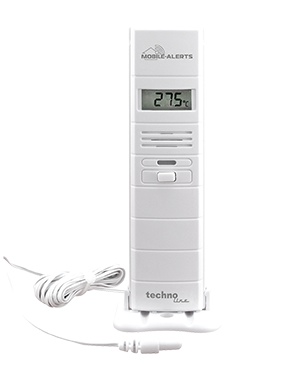
Usage
Sensor
for monitoring of indoor or outdoor temperatures, humidity and non
corrosive liquids. The sensor must be mounted protected from direct sun
and rain.
Specifications
Batteries:
2 x micro (LR03, AAA) alkaline
Battery life:
approx. 2 years
Measuring range temperature:
– 39.9°C to + 59.9°C
Accuracy temperature:
+/- 1°C
Measuring range humidity:
20% to 99%
Accuracy range humidity:
+/- 4%
Measurement intervals:
7 minutes
Transmission range:
100m (open area)
Cable length:
1,5m
Representation in the app
<<<
back to the sensor overview
<<<
back to the help
MA10320 - pro series
Temperature and hygrometer sensor of professional series with additional cable temperature sensor
Master ID09
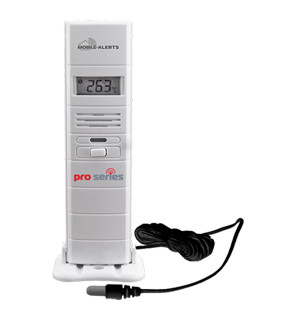
Usage
Sensor
for monitoring of indoor or outdoor temperatures, humidity and non
corrosive liquids. The sensor must be mounted protected from direct sun
and rain.
Note: This professional sensor has opposite standard sensors an extended measuring range and additional functionality.
Specifications
Batteries:
2 x micro (LR03, AAA) alkaline
Battery life:
approx. 2 years
Measuring range temperature:
– 39.9°C to + 59.9°C
Accuracy temperature:
+/- 1°C
Measuring range probe temperature:
– 50.0°C bis + 110.0°C
Accuracy probe temperature:
+/- 0.5°C
Measuring range humidity:
20% to 99%
Accuracy range humidity:
+/-
3%
Measurement intervals:
3.5 minutes
Transmission range:
100m (open area)
Cable length:
1,5m
Representation in the app
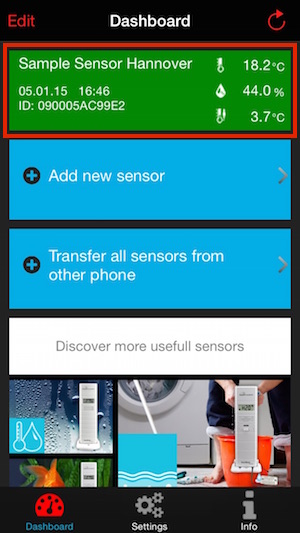
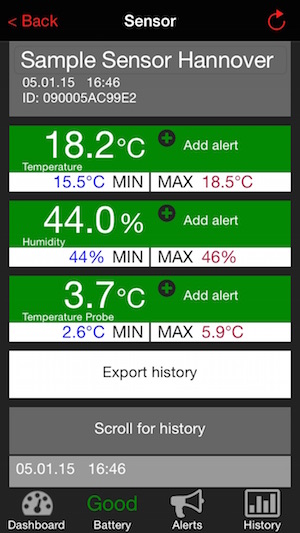
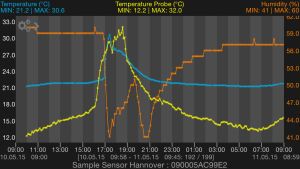
Turn your smartphone into the vertical viewing mode to show a detailed graphic view of the sensor data.
Then touch the cogwheel-symbol on the display to open a toolbar.
The “ i ” symbol in this toolbar will lead to more information about all parts of the diagram.
<<<
back to the sensor overview
<<<
back to the help
MA10350
Temperature and hygrometer sensor with water detection cable sensor
Master ID04
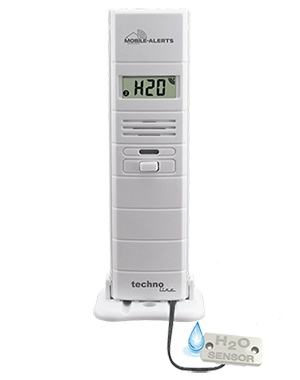
Usage
Sensor
for monitoring of indoor or outdoor temperatures, humidity and water
detection. The sensor must be mounted protected from direct sun and
rain.
Specifications
Batteries:
2 x micro (LR03, AAA) alkaline
Battery life:
approx. 2 years
Measuring range temperature:
– 39.9°C to + 59.9°C
Accuracy temperature:
+/- 1°C
Measuring range humidity:
20% to 99%
Accuracy range humidity:
+/- 4%
Measurement intervals:
7 minutes
Transmission range:
100m (open area)
Cable length:
1,5m
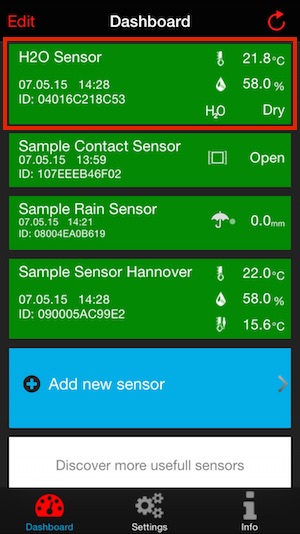
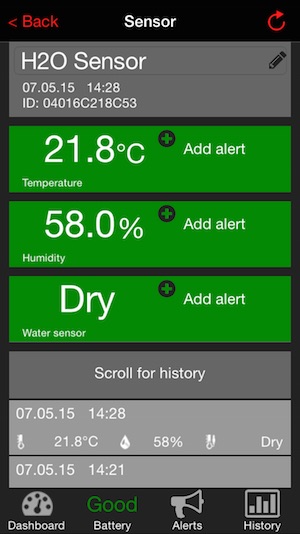
Representation in the app
<<<
back to the sensor overview
<<<
back to the help
MA10650
Rain meter
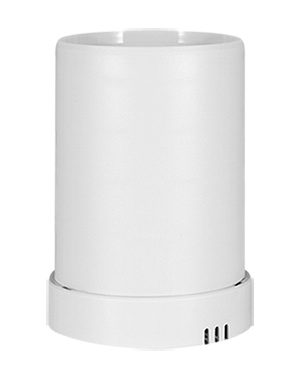
Usage
Sensor for monitoring of rain.
Specifications
Batteries:
2 x mignon (LR06, AA) alkaline
Battery life:
approx. 2 years
Measuring rain:
0.258 mm
Accuracy rain:
+/-
3%
Measurement intervals:
continuously during precipitation
Transmission range:
100m (open area)
Representation in the app
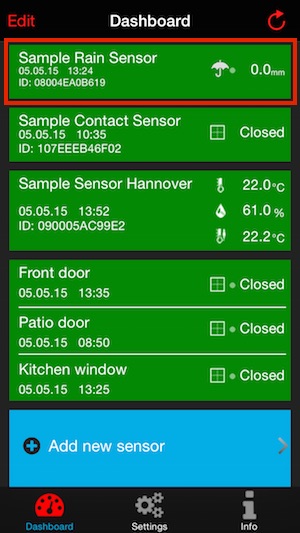
Touch the rain sensor field to enter the sensor menu.
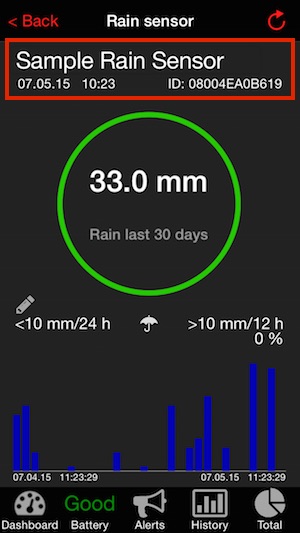
Touch the current label left to the pencil icon to change the name of the sensor.
You can see the time of the last rain sensor data reception and the sensor ID below.
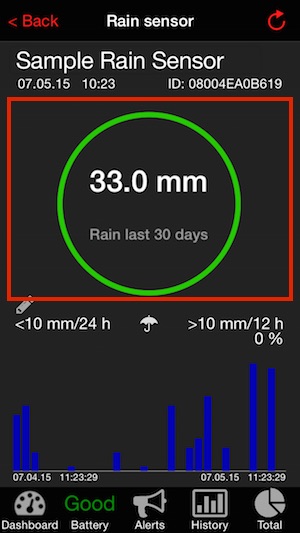
In
the circle rainfall data of specific periods of time are displayed.
Swipe to the right or left to switch between different time
periods. Tap a value to stop the automatic scrolling. The rain units
can be changed in the settings menu between inch and mm.
In the circle the following data are displayed scrollable from left to right:
- Rain last 24 hours
- Rain last hour
- Heaviest rain last 24 hours (Heaviest rain last 24 hours indicates when the intensity of the rain was most. The value of mm / h is calculated by the time interval between two rocker beats, extrapolated to a value when this intensity had continued for one hour.)
- Rain last 7 days
- Rain last 30 days
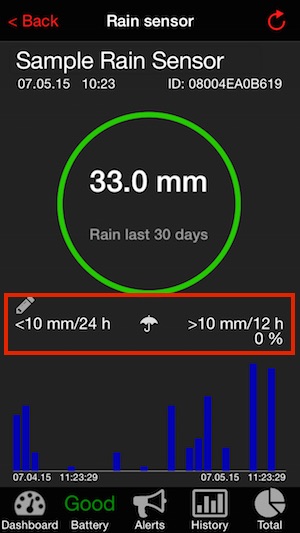
Below the circle is the line for alerts.
Tap into the line below the pin to switch to edit alert menu.
Left is the minimum alarm value, to the right the maximum alert value
and in the middle the alert icon for current rain is displayed. Symbols
are only visible when the respective alarm is activated.
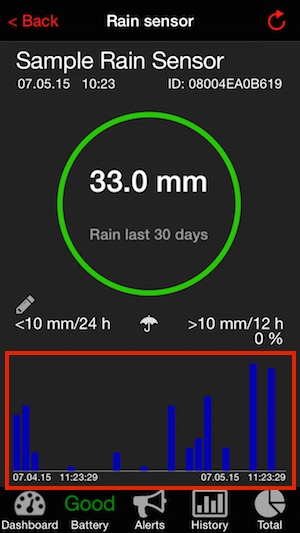
A
diagram applicable to the certain period is displayed in the
lower part. The periods are always exact, the value of the last hour is
exactly 60 minutes back.
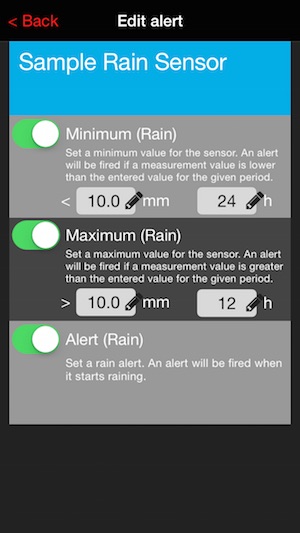
The following alarms can be activated here:
- Minimum (Rain) (Minimum period is 24 h)
- Maximum (Rain) (Minimum period is 1 h)
- Alert (Rain)
If the maximum alarm has been activated, the counting of the rain and the hours begin from the time of activation.
The percentage in the sensor view below the Maximum (rain) alarm
indicates to how much the alarm threshold is reached in %. At 50% the
color of the circle in the sensor view changes from green to yellow, at
75% from yellow to orange and at 95% from orange to red.
If the alarm threshold is reached, a push message is sent and the count
of time and rain amount is reset to zero, the counting starts over
again.
The Minimum and Maximum rain in x hours alarms are continuous alarms.
If, for example, Minimum (rain) is activated and set for a period of 24
h, a push message is sent when the alarm value has been reached, until
the alarm is deactivated, for every 24 hours.
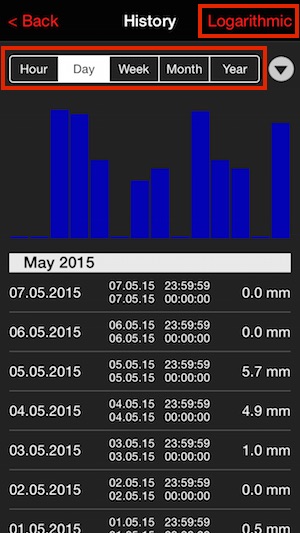
Tapping Logarithmic or linear, you can switch between the views.
Tap the various periods of time to display them.
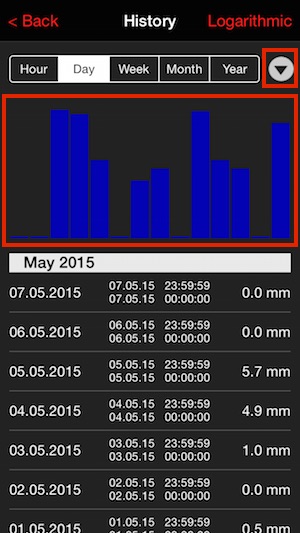
Tap the arrow to sort the data ascending or descending.
You can scroll through the bar graph from left to right.
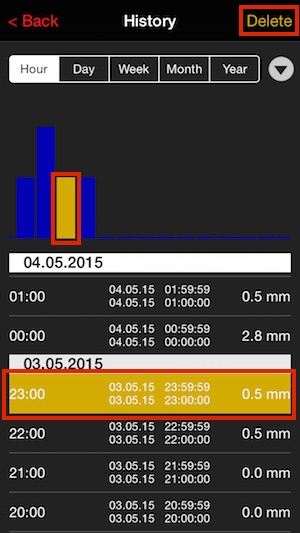
If you select a value by tapping, then the matching bar is highlighted in yellow.
If you want to choose a value far back in time, highlight the
record of the desired period of time in the year range. If you select
the next smaller unit of time now, for example, the month, the matching
period will be displayed automatically. Tap “Delete” on the top right,
to delete the selected value for the selected period in the app.
In the day view you can select a detail view instead of deleting, it can be selected by tapping Details.
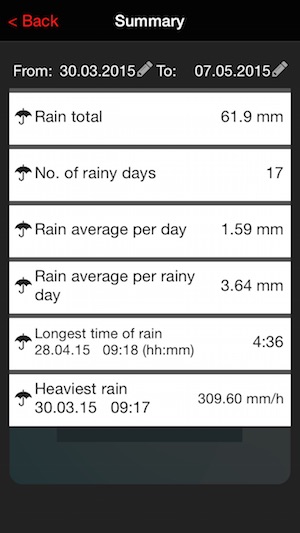
By tapping next to "From:" and "To:" You can select the time period of the summary.
Longest rain time specifies the time period in which the counter rocker turned at least every 2hours once.
Heaviest rain indicates when the intensity of the rain was most. The
value of mm / h is calculated by the time interval between two rocker
beats, extrapolated to a value when this intensity had continued for
one hour.
<<<
back to the sensor overview
<<<
back to the help
MA10660
Anemometer
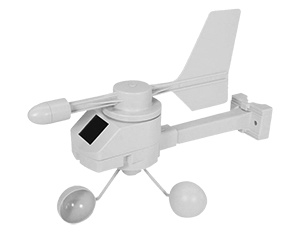
Usage
Sensor for monitoring wind direction and wind strength.
Specifications
Power supply:
Solar / accumulator
Measuring wind direction:
0 - 180km/h
Accuracy wind direction:
0,36km/h
Measurement intervals:
7 minutes
Transmission range:
100m (open area)
Dashboard

Touch the wind sensor field to enter the sensor menu.
In the dashboard the last measured wind direction, wind speed and gust are displayed.
Windmeter menu
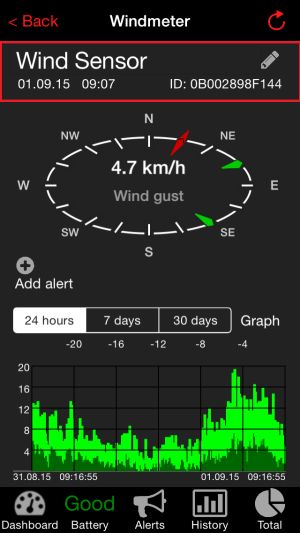
Touch the current label left to the pencil icon to change the name of the sensor.
You can see the time of the last rain sensor data reception and the sensor ID below.
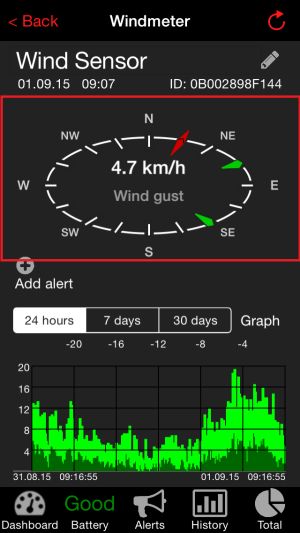
In the compass you can view the most recently measured wind direction, wind speed and gust display. Swipe to the right or left to switch between wind speed, wind gust and direction. The unit can be selected in settings menu between kn, mph, km / h and m / s. The red arrow indicates the last measured wind direction, the green arrows show previous directions.
The wind sensor measures 21 times within 7 minutes, the measured values are transmitted every 7 minutes. The app displays the most occurring wind direction, as well as an average of the measured wind speeds and the highest speed as gust which occurred within the measurement time.
In the compass the following data are displayed scrollable from left to right:
"Wind speed"
"Gust"
"Wind direction"
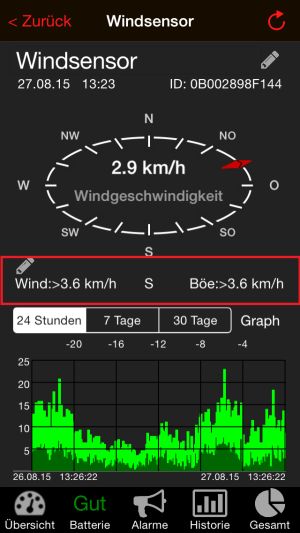
Below the compass is the line for the alarms.
Tap "Add Alert" on to enter the alarm settings.
On the left is wind speed alert value, on the right gust alert value and in the middle the alert for currently chosen wind directions are displayed. Symbols are only visible when the respective alarm is activated.
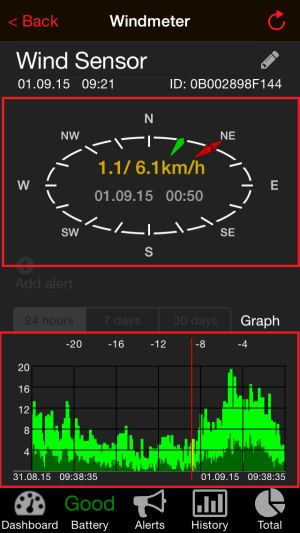
At the bottom a graphic is displayed for the wind speeds for the selected period. A graphic for the last 24 hours, 7 days or 30 days can be selected.
By longer touching the diagram, you can display the measured values for the selected time in the compass rose. The selected period will be marked by a vertical red line.The values for wind speed / gust of wind, the date and time of measurement and the wind direction will be displayed in the compass rose.
Edit alert menu
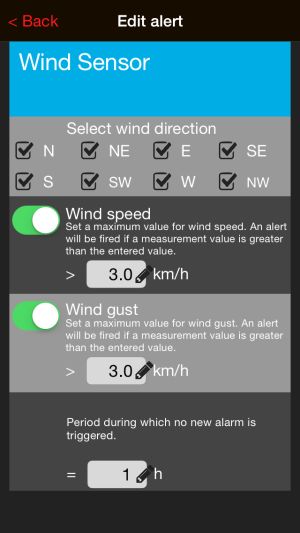
The following alarms can be activated here:
Select wind direction: selected for which wind directions wind speed and / or wind gusts alarms are generated
Wind speed
Wind gust
Period while no new alert is triggered.
If an alert value is exceeded, no new alert is triggered for the selected time period after. This encloses all chose wind directions. Time periods for wind speed and wind gust are counted separately.
Alerts
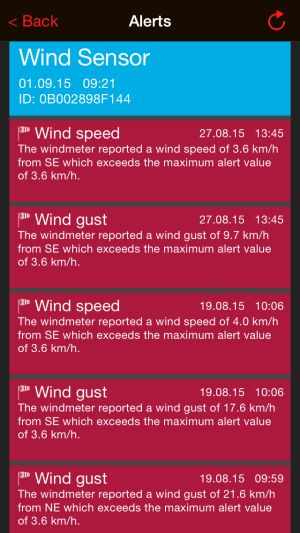
Recent alerts are displayed here.
History
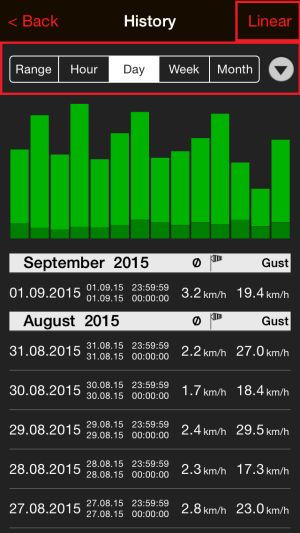
Tapping Logarithmic or linear, you can switch between the views.
Tap the various periods of time to display them.
The period section “Range” displays, after selecting a graphical summary of the measured wind direction, speed and gusts and their percentage for an adjustable period. A more detailed description can be found below in the "Graph" section and "Range".
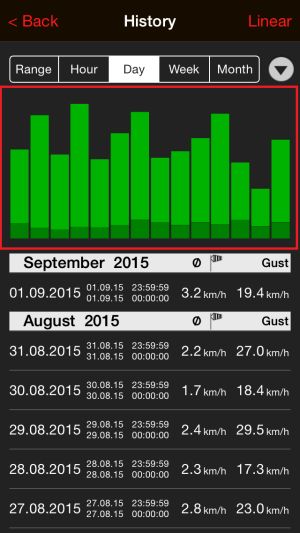
Tap the arrow to sort the data ascending or descending.
You can scroll through the bar graph from left to right.
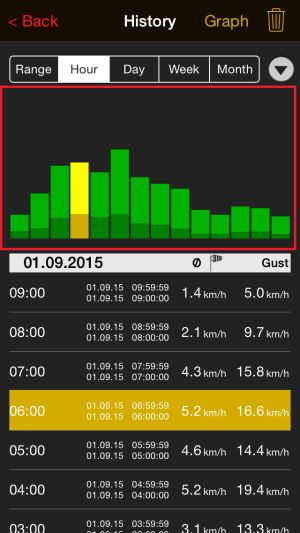
If you select a value by tapping, then the matching bar is highlighted in yellow. If you select a value by tapping, then the matching bar is highlighted in yellow.
If you want to choose a value far back in time, highlight the record of the desired period of time in the year range. If you select the next smaller unit of time now, for example, the month, the matching period will be displayed automatically.
Tap on the bin in the top right, to delete the selected value for the selected period in the app.
Tap, after a value or bar was highlighted, on "Graph" to display a graphical summary of measured wind directions, speeds and gusts and their percentage for the selected period.
Graph
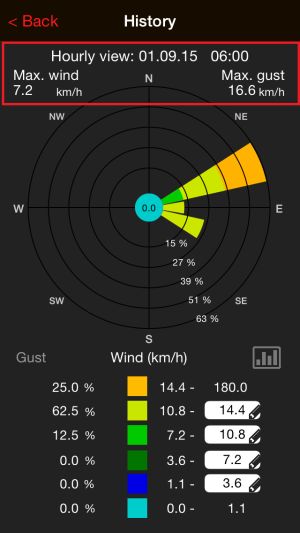
At the top you can see the time period of the values represented graphically, and within this period occurred maximum wind speed and gust.
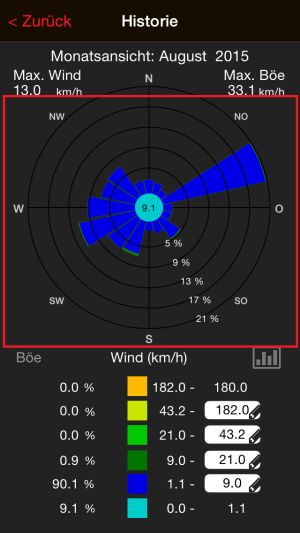
Below is a graphic showing the overall share of wind speeds in the various wind directions and the overall proportion of wind directions occurred during the period. The percentage of wind directions can be read on the percentage figures, which are located between "S" and "SO".
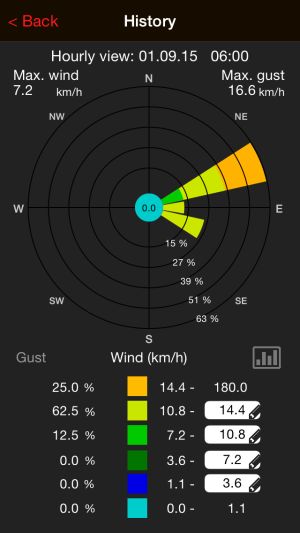
In the lower part there is an overview, where wind speed ranges can be assigned to specified colors. Tap the white box with the pencil icon to define a self-selected range for one color.
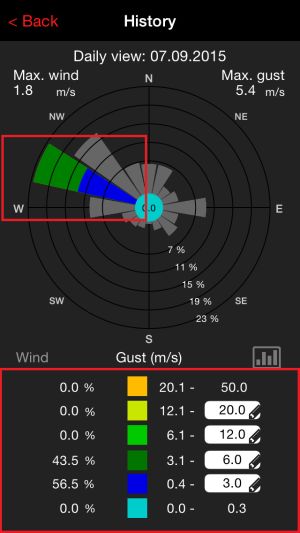
Tap a leg in the graphic, to display the percentage of wind speeds for the selected wind direction in the table below. Tap it again to unselect.
Range
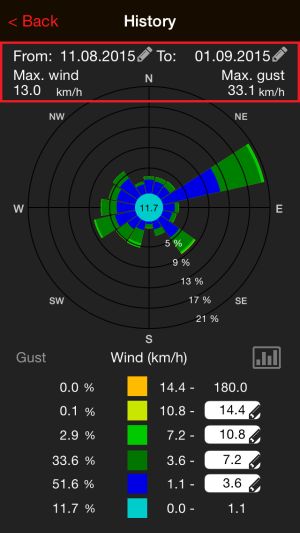
The displays in the "Range" view correspond to the informations of "Graph" view.
Here the time period can be chosen manually. Tap on the date, it appears a selection in order to define the start and end dates.
Total
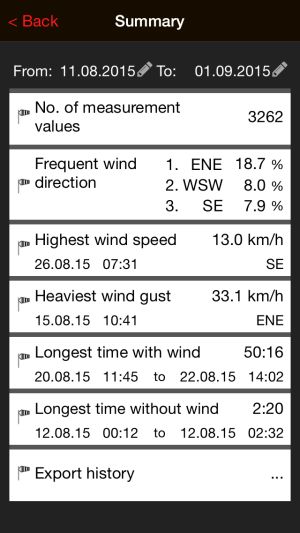
By tapping next to "From:" and "To:" You can select the time period of the summary.
Tap "Export History" to get the saved values as a .csv file by E-mail.
<<<
back to the sensor overview
<<<
back to the help
MA10800
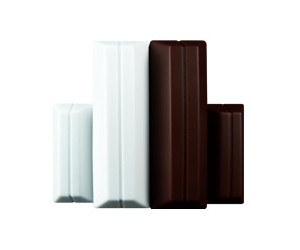
Contact sensor
Master ID10
Usage
Sensor for controlling opening and closing operations, for example of windows, doors, drawers and others .
Specifications
Batteries:
2 x SR44
Battery life:
approx. 2 years
Measurement intervals:
change of state, functional status every 6 hours
Transmission range:
100m (open area)
Representation in the app
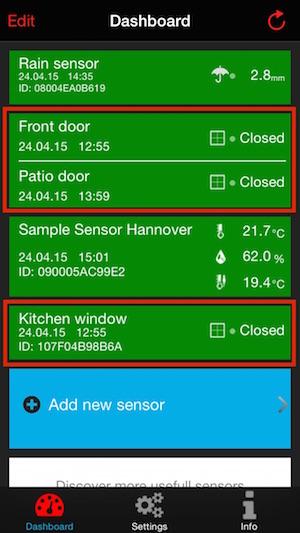
Touch the contact sensor field to enter the sensor menu.
If contact sensors (min. 2) are sorted to each other, they are shown in groups.
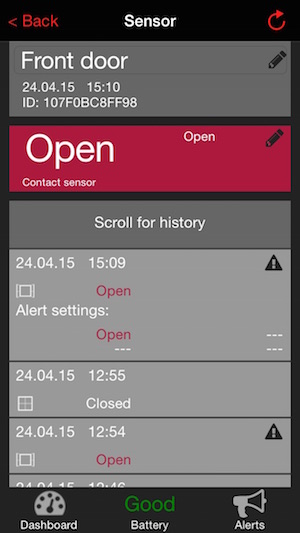
Touch the current label left to the pencil icon to change the name of the sensor.
Between sensor name and the last 50 occurring events is the indicator for the current status.
Further you can see which alarm is set and you can add an alert with by tapping below the pin.
To view the last 50 events
scroll down. A history beyond the last 50 events is not available for
contact sensors. Records with a triangle indicate activated alerts.
With a tap on the value, you can display the alarm that has occurred.
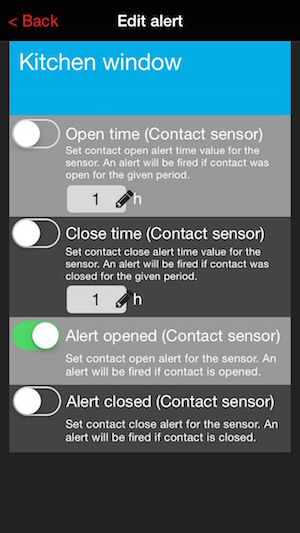
Here the following alerts can be activated:
- Open time
- Closed time
- Alert opened
- Alert closed
<<< zurück zur
Sensorübersicht
<<<
zurück zur Hilfe
MA10850 (available in the future)
Energy cost monitor
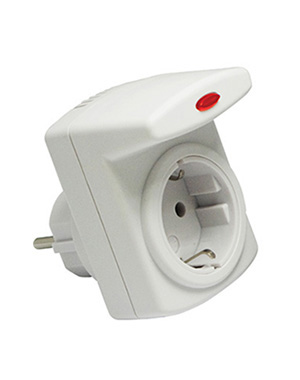
Usage
Sensor for monitoring of energy consumption.
Specifications
maximum power:
3600W / 16A
Measuring power:
0,2 - 3600W
Measurement intervals:
7 minutes
Transmission range:
100m (open area)
<<<
back to the sensor overview
<<<
back to the help
WL2000
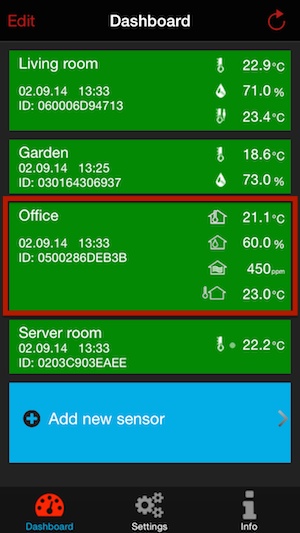
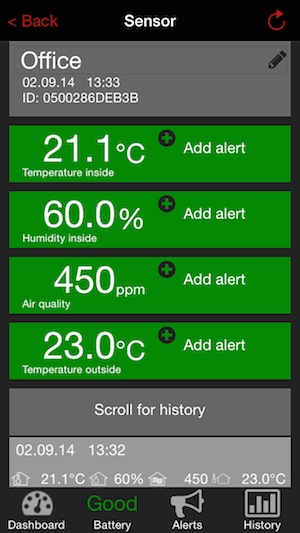
Air quality monitor
Master ID05
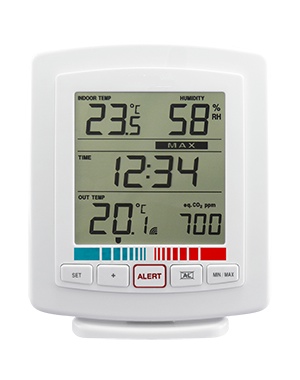
Usage
Station
for monitoring of indoor and outdoor temperatures, humidity (indoor)
and nair quality. The outdoor sensor must be mounted protected from
direct sun and rain.
Specifications
Batteries:
2 x baby (LR14, C) alkaline (monitor)
2 x micro (LR03,
AAA) alkaline (sensor)
Battery life:
approx. 2 years
Measuring temperature (indoor):
– 9.5°C to + 59.9°C
Accuracy temperature (indoor):
+/- 1°C
Measuring Temperatur (outdoor):
– 9.5°C to + 59.5°C
Accuracy temperature (outdoor):
+/- 1°C
Measuring temperature (hygrometer):
20% to 95%
Accuracy temperature (hygrometer):
+/- 4%
Measurement intervals:
7 minutes
Transmission range:
100m (open area)
Representation in the app
<<<
back to the sensor overview
<<<
back to the help
Other sensors (available in the future)
Pool sensor, monitoring of water temperature
Plants humidity detector, monitoring of water requirements of plants
<<<
back to the sensor overview
<<<
back to the help